Export
The export dialogs are accessed through the main toolbar or with Ctrl+E on the keyboard.
The last export settings used are saved inside the project file itself. You can always reset those to the default value by pressing the Reset button.
Audio
Audio export supports Wav (16 or 32 bit) and Ogg/Vorbis. Only a single song can be exported at a time.
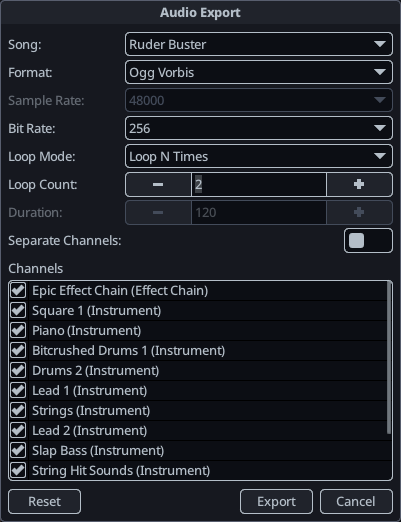
- Song: The song to export.
- Format: Audio format to export to. WAV files are uncompressed and sound better, but are much larger.
- Sample Rate: Currently locked to 48 KHz, support for other sample rates will be added in future releases.
- Bit Rate: Audio bit rate for compressed formats. Lower bit rates result in smaller files, at the cost of audio quality.
- Loop Mode: A song can be exported in one of two modes:
- Play N Times: Will play the song a specified number of times.
- Duration : Will loop though the song for the specified number of seconds.
- Separate channel files : Will output each channel in a separate audio file. When using this mode, the app will prompt you to choose a Folder instead of a file and will automatically name the files based on the song and channel name.
- Channels : List of channels to export. When using separate channels, these are simply omitted, otherwise will mute the channels.
MIDI
MIDI export is fairly basic at the moment. Each KiraStudio channel will get its own MIDI channel.
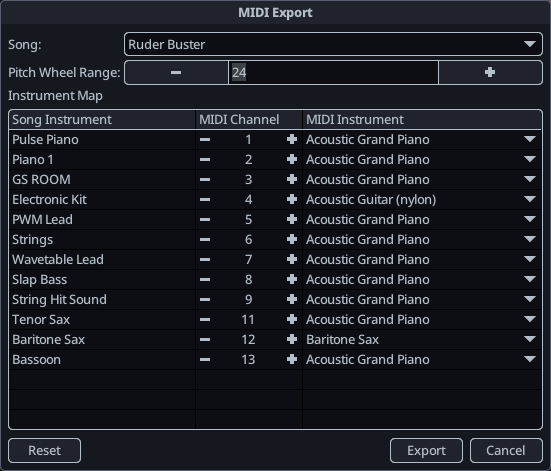
- Song: The song to export.
- Pitch Wheel Range: The maximum range of the pitch wheel, in semitones. Since MIDI has a limited precision for pitch wheel events, the wider the range, the less precision exported slides will have.
- Channels : The MIDI channel and instrument to assign to each channel of your song.