Effects Reference
This page contains information about all the audio effects supported by the app and their various parameters.
Effects are little modules that can be added to any channel to alter the raw output of the channel. Once the audio of all the various generators is generated, is it processed by each effect, in order, from top to bottom. It is then fed to downstream effect chains, if any.
For this reason, effects cannot use the "Trigger" mode on their envelopes, since effects are applied on the final audio audio generated by all notes playing. In other words, by the time effects are applied, the notion of individual notes being triggered no longer exists.
 Volume
A simple volume adjustment. Unlike the channel volume which is applied after all channel effects, this one can be placed anywhere in the effect list. This allows for minor volume adjustments before or after a specific effect.
Parameters:

- Volume : Volume adjustment
 Pan
Pan
A simple stereo balance adjustment. Unlike the channel balance which is applied after all channel effects, this one can be placed anywhere in the effect list. This allows for panning adjustments before or after a specific effect.
Parameters:

- Channels : Optional processing to apply to the stereo channels prior to panning such as swapping L/R and mixing down to mono.
- Mode : Balance simply attenuates one of the channels, Pan can make channels bleed into each other.
- Pan : Left/right panning or balance.
 Filter
A collection of versatile filters (low-pass, high-pass, band-pass, notch, etc) designed to selectively shape, attenuate, or emphasize specific frequency ranges of the audio signal.
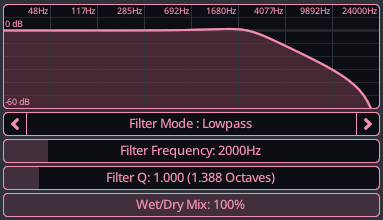
- Filter Mode : The type of filter to apply, lowpass, highpass, bandpass or notch.
- Frequency : The frequency of the filter, exact meaning depends on the type of filter.
- Filter Q : Controls how narrow and resonant the filter is around its cutoff frequency.
- Wet/Dry Mix : How much of the filtered signal to mix in.
 Equalizer
A three-band parametric equalizer with bass, mid, and treble controls, offering advanced options to adjust each band's frequency and resonance (Q) for precise tonal shaping.
Internally it is the combination of 3 filters (low, mid, high) applied in succession.
General Parameters:
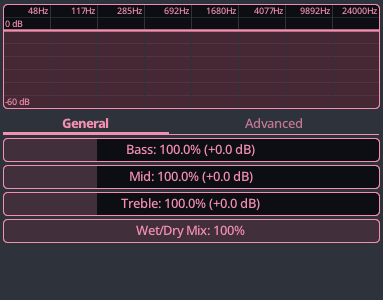
- Bass : Intensity of the low frequencies.
- Mid : Intensity of the mid frequencies.
- Treble : Intensity of the high frequencies.
- Wet/Dry Mix : How much of the equalized signal to mix in.
Advanced Parameters:
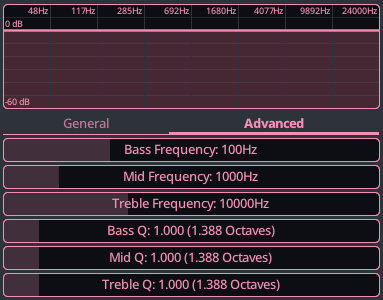
- Bass Frequency : Center frequency of the bass filter.
- Mid Frequency : Center frequency of the mid filter.
- Treble Frequency : Center frequency of the high filter.
- Bass Q : The bandwidth of the bass filter.
- Mid Q : The bandwidth of the mid filter.
- Treble Q : Center frequency of the high filter.
 Reverb (Freeverb)
The original Freeverb by Jezar at Dreampoint. The audio community is eternally grateful for their amazing contribution.
This reverb is very straightforward and easy to use, but is somewhat limited in functionality.
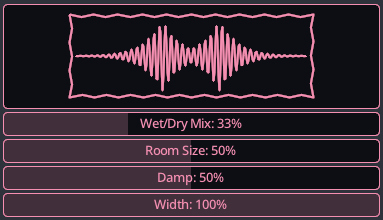
- Wet/Dry Mix : Ratio of the reverberated to dry signal to mix in.
- Room Size : Controls reverb length and spaciousness, larger values simulate bigger rooms.
- Damp : Reduces high frequencies over time, simulating absorption by soft surfaces.
- Width : Adjusts stereo spread, from mono (narrow) to wide stereo image.
 Reverb (Cloud Seed)
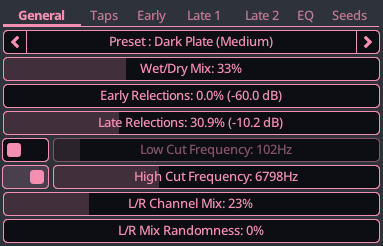
Cloud Seed is an algorithmic reverb plugin, designed for emulating huge, endless spaces and modulated echoes. It is powerful and flexible but considerably more complex than Freeverb.
The core code is gracefully provided by Ghost Note Audio under MIT license. Please visit their website to see all their products, including a VST version of this reverb, which comes with a much nicer user interface.
Instead of documenting every parameter here, we refer users to the Cloud Seed user guide.
All parameters in KiraStudio are exactly the same as in the user guide, the only different being that in KiraStudio, they are expressed in their proper units (Hz, seconds, dB, etc.) instead of the simple 0-100% knobs the original plugin provides.
 Chorus
A three-phase stereo chorus effect that thickens and widens the sound, adding subtle movement, depth, and lush spatial texture.

- Wet/Dry Mix : Ratio of the choruse to dry signal to mix in.
- Rate : Controls how fast the pitch modulation cycles.
- Depth : Sets how much the delay time is modulated.
- Feedback : Feeds output back into input for thicker, more resonant sound.
 Delay
Delay
A flexible delay effect featuring mono, cross, and ping-pong modes, with an optional low-pass filter to smooth repeated echoes for a polished, spacious sound.
Automation of the delay amount (seconds or quarter notes) is possible, but can create audible artefacts if changed too rapidly. Changing it slightly (ex: +/- 5ms) using a slow sine or triangle wave can be used to create a time-swept modulated delay, which can prevent the delayed audio from being perflectly in phase with the dry audio.
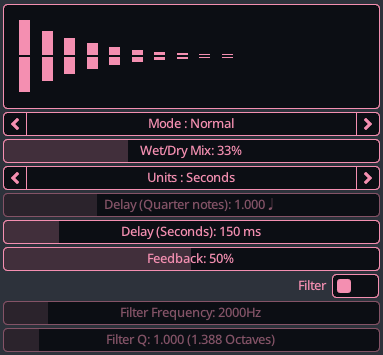
- Mode : Various delaying mode supporting both mono and stereo. Ping-pong makes the audio continuously bounce from L/R, while cross swaps L/R.
- Wet/Dry Mix : Ratio of the delayed to dry signal to mix in.
- Units : The units to use for the delay amount, can be seconds or quarter notes, to more easily sync up with the song. When using quarter notes, you are still limited to a maximum of 1 second of delay.
- Delay : The delay amount, in the unit chosen.
- Feedback : Controls how much delayed signal is re-fed into the delay, affecting echo repetitions and decay length.
- Filter : Optional filter to apply to the delayed echoes.
- Filter Frequency : The frequency of the filter, exact meaning depends on the type of filter.
- Filter Q : Controls how narrow and resonant the filter is around its cutoff frequency.
 Bit Crusher
A bit crusher effect that intentionally degrades audio by lowering bit depth and sample rate, producing gritty, lo-fi, and digitally distorted textures.
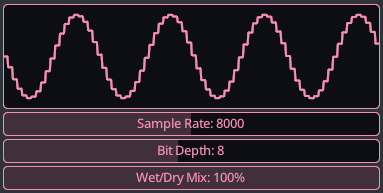
- Sample Rate : Lowering the sample rate reduces the temporal resolution, adding aliasing and harsh, digital artifacts.
- Bit Depth : Lowering the bit depth increases quantization noise, creating gritty, distorted, crunchy textures.
- Wet/Dry Mix : How much of the degraded signal to mix in.
 Compressor
A versatile compressor that reduces dynamic range by attenuating signals above a threshold. Features adjustable ratio, soft knee, attack/release timing and makeup gain for transparent or punchy dynamics control.
The compressor effect can optionally use another channel as a side-chain. The side-chain channel needs to be located upstream of the channel the compressor is on. In other words, the side-chain channel cannot be a channel that depends on the output of the compressor.
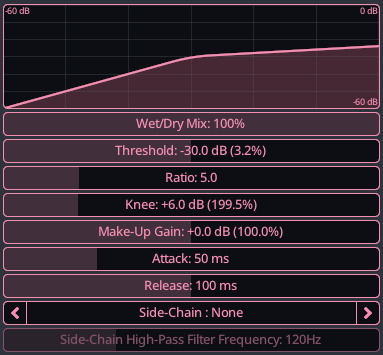
- Wet/Dry Mix : How much of the compressed signal to mix in.
- Threshold : Signal level where compression begins reducing volume to control dynamic range
- Ratio : Determines how strongly audio above the threshold is reduced by the compressor
- Knee : Smooths the transition between uncompressed and compressed signal levels around the threshold
- Make-Up Gain : Boosts output volume after compression compensates for reduced signal level
- Attack : Controls how quickly compression engages after the signal exceeds the threshold
- Release : Controls how quickly compression stops after the signal falls below threshold
- Side-Chain : Optional channel to use as input for the compressor, needs to be upstream from current channel
- Side-Chain High-Pass Filter Frequency : Removes low frequencies from the detector to reduce bass-triggered compression
 Distortion
A simple distortion effect with adjustable drive and multiple shaping modes. Focuses purely on waveshaping and clipping, leaving tone shaping and filtering to be added separately in your signal chain.
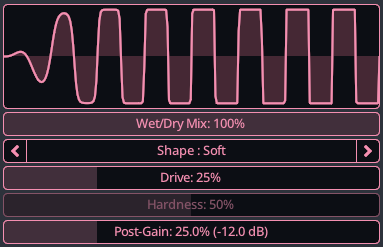
- Wet/Dry Mix : How much of the distorted signal to mix in.
- Shape : The wave shaper to use, affects the shape of the distorted waveform and how it is clipped. Soft is based on
tanh, Hard is a simple clamp and Soft Saturation is based on this Music DSP post. - Drive : The gain to apply to the input signal, higher value leads to more clipping.
- Hardness : For waveshapers supporting it, how hard the clipping is.
- Post-Chain : Gain applied to the waveform after the distortion is applied.