KiraStudio
Compose. Design. Automate.


News
Version 1.1.1 was just released and contains some fixes to bugs that were introduced in 1.1.0. Please check out the changelogs for more details.
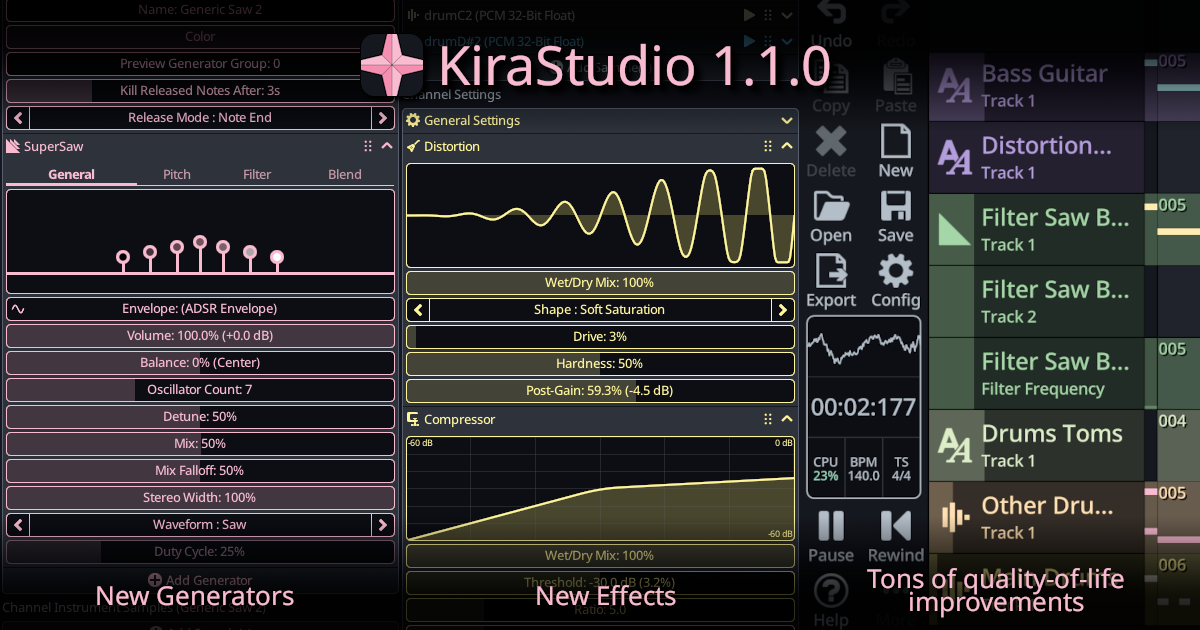
KiraStudio 1.1.0 was just released! This is the first major update since the launch of the app.
This new version significantly expands its sound design capabilities with new effects and generators, while introducing powerful workflow improvements, enhanced MIDI support, custom tuning, and broad performance and usability enhancements across all platforms.
Please check out the highlights page for more details on the new features an how to use them.
Download
Features
- Make music on desktop (Windows/MacOS) or on the go (Android/iOS phone and tablet/iPad layout).
- Add new channels and tracks, create and reuse patterns in the sequencer
- Pop open the mixer view to quickly adjust volume, balance and connect effect chains
- Use the fully-polyphonic piano roll to edit notes and their associated parameters (velocity, pan, etc)
- Preview instruments in real-time using the on-screen piano, QWERTY input or a connected MIDI controller
- Edit curves using various editors for ADSR envelopes, custom curves (LFO) and sequences
- Control dynamics of various curves by choosing how their rate and scale are affected by velocity & aftertouch
- Customize instruments by assembling sound "generators" in creative ways to create unique sounds
- Route channels through effect chains
- Edit custom wave tables or use one of the built-int presets in the WaveTable Editor
- Load and lightly edit samples, set loop and stitch points in the Sample Editor
- Switch to one of the user-contributed translations (French, Russian, Portuguese or Chinese)
- Oscillators : Saw, Square, Triangle, Sine, Noise and SuperSaw. Fully customizable to sound as clean or retro as you need
- Frequency Modulation (FM) synthesis : 2/3/4 operators highly customizable FM synth
- WaveTable : Wavetable with support for cycling through multiple-waveforms
- PCM Sampler : Load samples, edit loop/stitch points and assign them to keys of the pianos
- 8-Bit Calculator: ByteBeat interpreter allowing input of custom sound-generating equations
- SoundFont : Simply load SF2 or SF3 (OGG compressed) and use any preset you want*
- Yamaha emulation : YM2413, YM2612, YM3812, YMF262, YM2149, YM2610**
- Famicom/NES emulation: Basic 2A03 channels and most audio expansions**
- GameBoy emulation : Basic channels**
* Please see the documentation for limitations, especially when it comes to modulator support.
** Include multiple "fakebit" quality of life enhancements such as full polyphony support and infinite ROM storage. Please see the documentation for details on emulation limitations as this is app is not aiming at high hardware emulation accuracy.
- Volume and Pan adjustments
- Low-pass, high-pass, band-pass and notch filters
- Three-band equalizer
- Reverb (Freeverb and CloudSeed)
- Chorus
- Distortion
- Compressor
- Stereo delay
- Bit crusher
- Automate almost any numeric parameter with curves, automation track or as a note parameter
- Choose from up to 3 types of curves : ADSR envelope, custom curve/LFO or sequence
- Automation track editor with interpolated or stepped curves
- Import and export MIDI files
- Export your songs to WAV and OGG
- Load SoundFont SF2 and SF3 (OGG compressed)
- Import samples from various formats (WAV, DMC and ADPCM-A ROM)